budctl
Control your wireless earbuds from Linux, without the vendor app: noise control, EQ, game mode,
touch controls, battery and more. There is a command-line tool, budctl, and a desktop app,
budctl-gui, both built on the same library.
- No telemetry and no account. budctl talks to your buds over Bluetooth, through BlueZ.
- The settings live on the buds, so budctl works alongside the phone app.
Supported buds: realme Buds T310. More are added as the author gets them.
Install
You need Linux with BlueZ, and for the desktop app a Wayland desktop. Release builds are for x86_64 and aarch64 (glibc 2.35 or newer).
curl -fsSL https://github.com/krolyxon/budctl/releases/latest/download/install.sh | shThis puts budctl and budctl-gui in ~/.local/bin, and a launcher entry in
~/.local/share/applications. The download is checked against its SHA-256 checksum. Options:
sh install.sh --version 0.1.1        # a given release instead of the latest
sh install.sh --prefix /usr/local    # elsewhere (uses sudo when it must)
sh install.sh --uninstall            # remove them again; your config and log stay
To build from source instead (Rust 1.88 or newer), run ./install.sh --source in a checkout.
On Arch, contrib/arch/PKGBUILD packages the release builds: run makepkg -si in that directory.
Pair the buds and connect them in your Bluetooth settings first.
Command line
budctl list                                # paired buds, and whether budctl knows them
budctl status                              # battery, noise control, EQ, switches
budctl anc off|on|transparency             # noise control
budctl anc light|medium|deep               # noise cancelling, at this strength
budctl eq                                  # the EQ presets, and the one in use
budctl eq deep-bass                        # select a preset
budctl eq custom-4 50=+3 16000=-2          # change bands of a custom preset (dB)
budctl eq new Gym                          # create a custom preset: flat, and put to use
budctl eq rename custom-4 "Gym mix"        # rename a custom preset
budctl eq delete custom-4                  # delete a custom preset
budctl game on|off                         # game mode (low latency)
budctl set bass-boost|spatial|wind|dual on|off
budctl dual                                # the phones and computers dual connection keeps
budctl bass 2                              # bass level, -5 to +5
budctl touch                               # what each tap and hold does
budctl touch left triple-tap previous      # give a gesture an action (--dry-run first, if you like)
budctl touch cycle off anc                 # the modes a hold steps through
budctl find start --yes                    # ring the buds (loud: take them out of your ears)
budctl find stop--jsonprints machine-readable output for scripts and status bars ("schema": 1).--debughex-dumps every frame sent and received, on stderr.--device <MAC>picks the buds when more than one supported pair is connected. Without it,"device"in the config file (below) is used, if set.
Exit codes:
| Code | Meaning |
|---|---|
| 0 | success |
| 1 | usage error |
| 2 | buds not found or not connected |
| 3 | control channel busy |
| 4 | the buds rejected the command or did not answer |
Desktop app
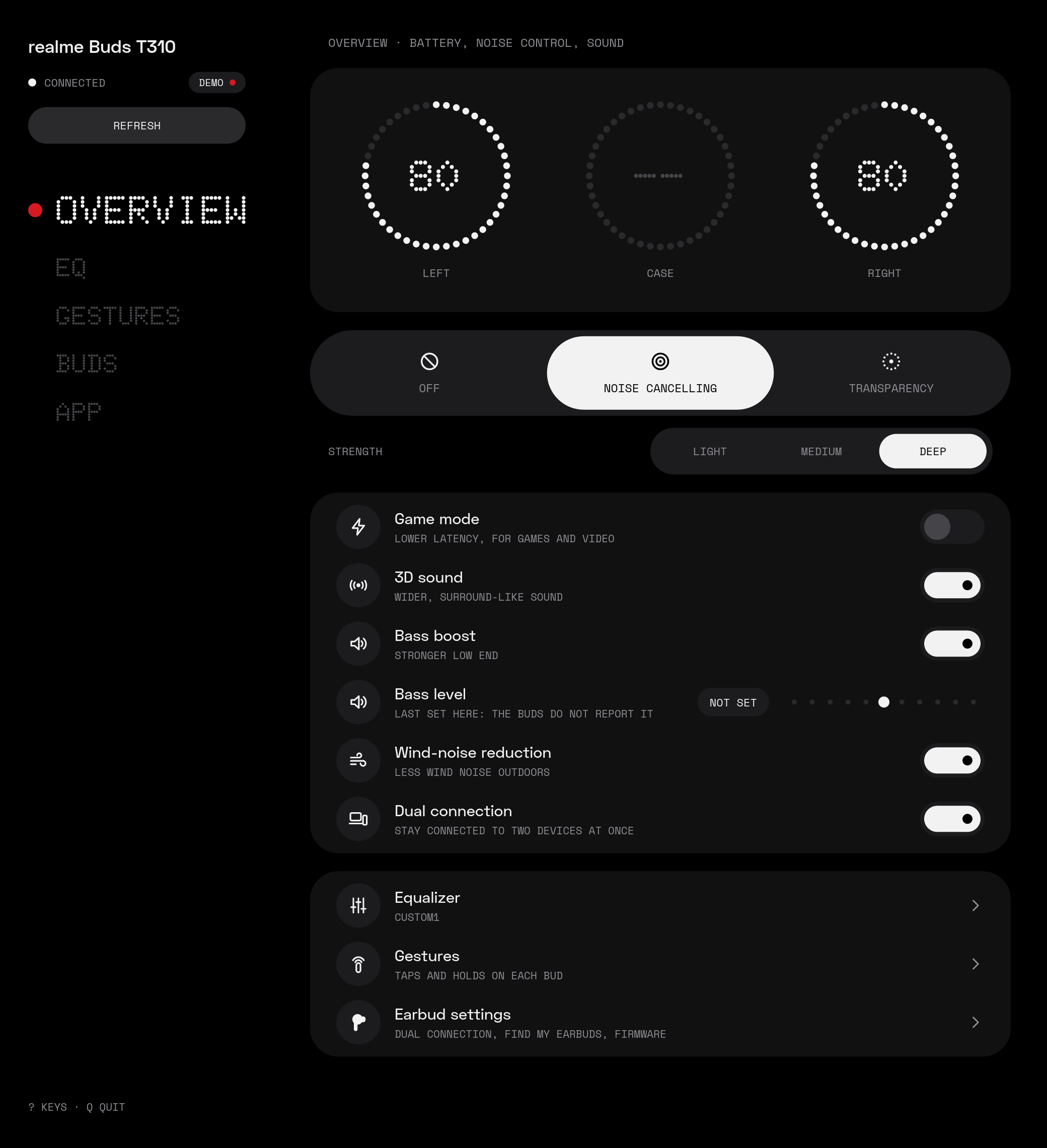
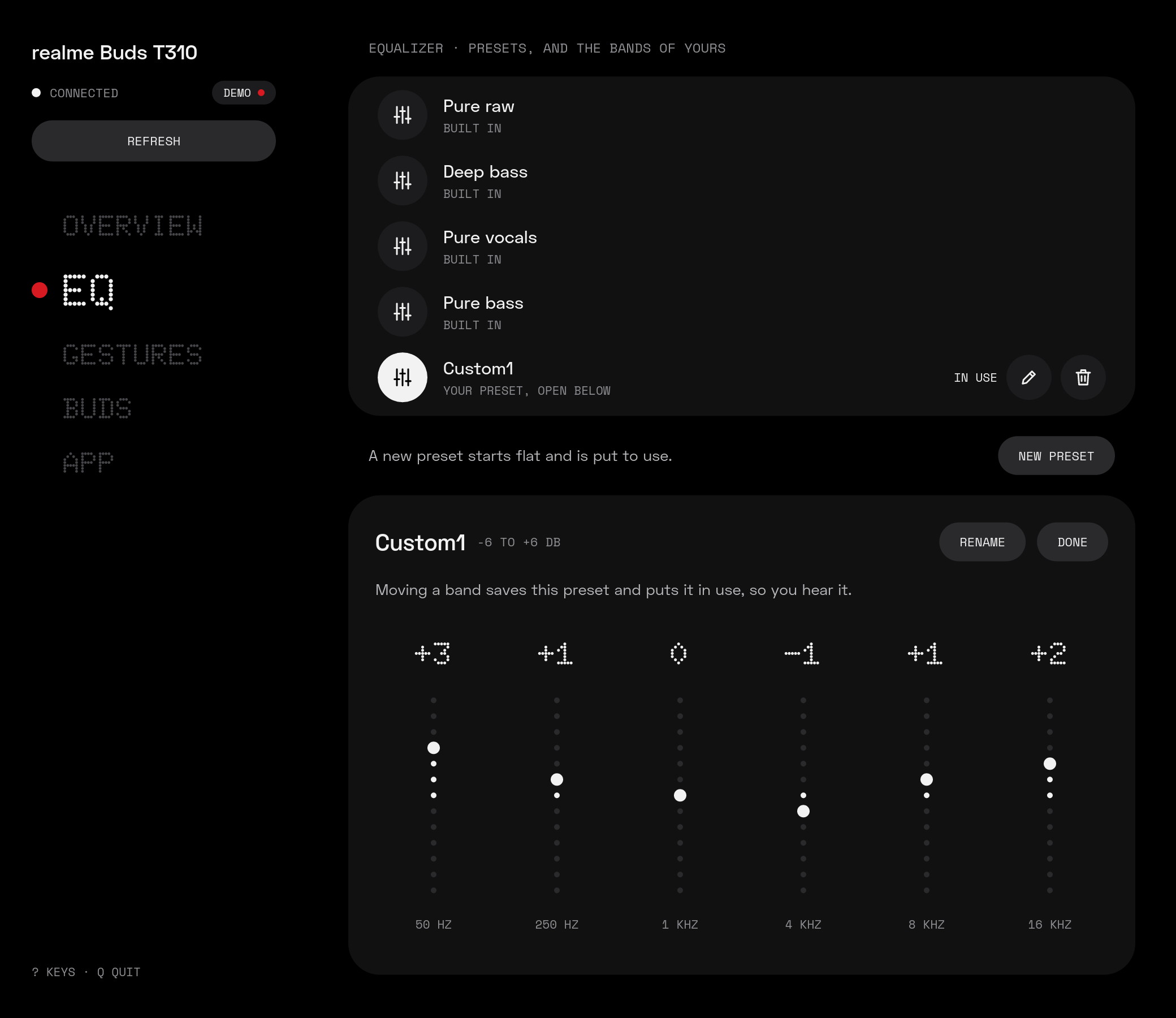
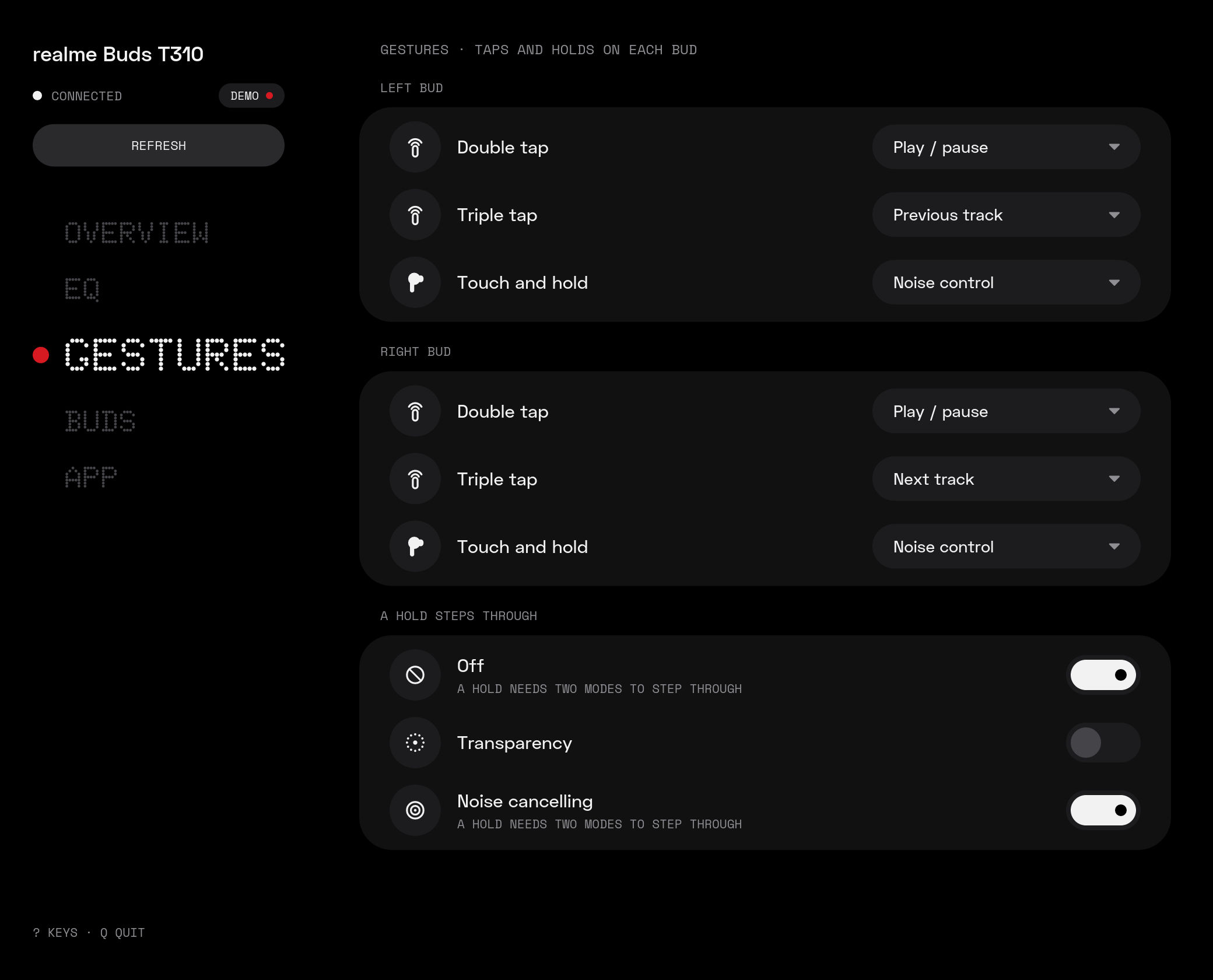
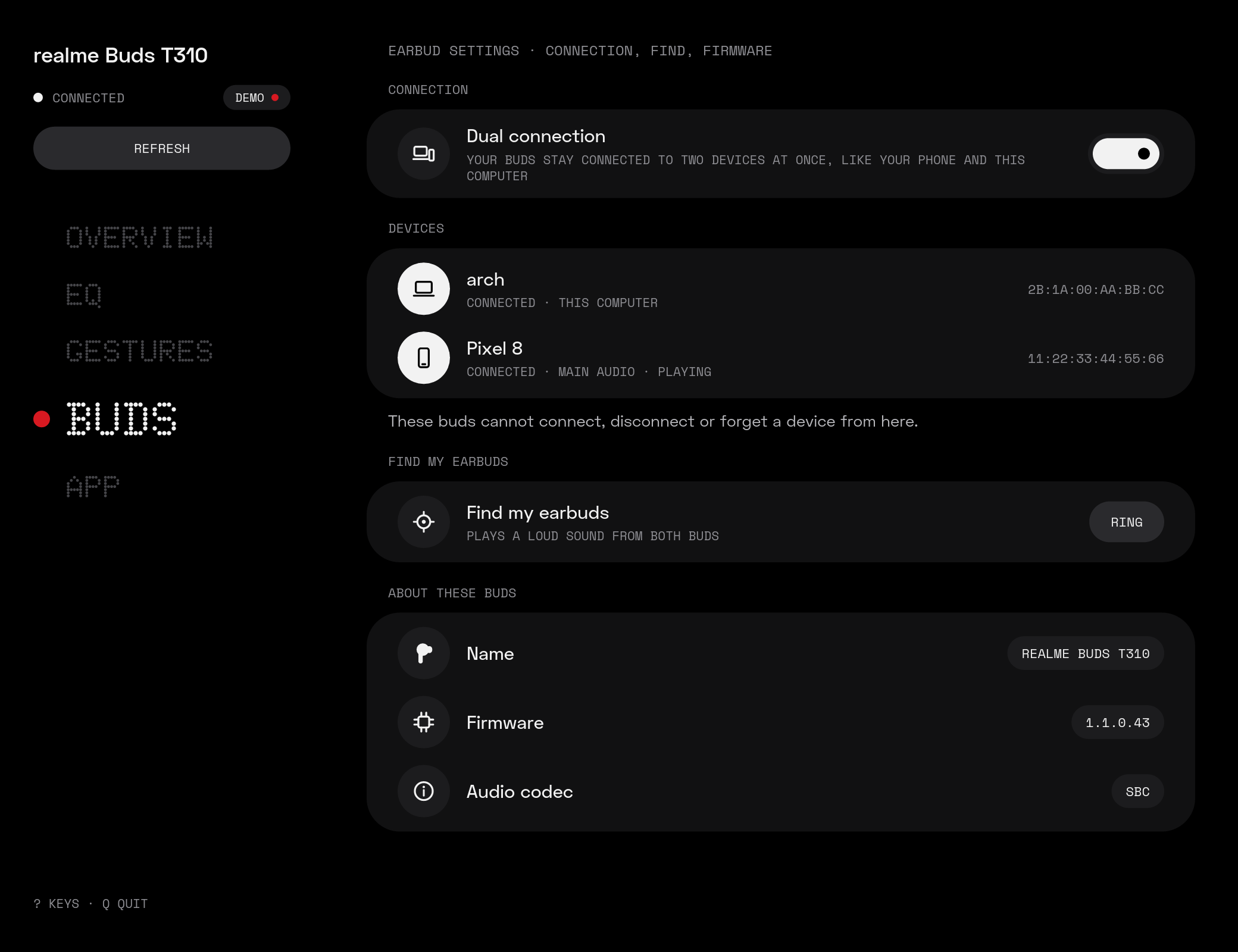
budctl-gui has five pages:
- Overview: battery, noise control and its strength, the switches, the bass level.
- Equalizer: the presets; create, rename and delete your own, and change their bands.
- Gestures: what each tap and hold does on each bud, and what a hold steps through.
- Earbud settings: dual connection and the devices it keeps, find my earbuds, firmware, audio codec.
- App settings: where the colors come from, the keys, the version.
 |
 |
 |
 |
The screenshots show --demo's made-up buds.
The app connects when it needs to, and frees the buds' control channel 10 s after your last change, so other apps can use it. A change shows "Saving…" until the buds confirm it.
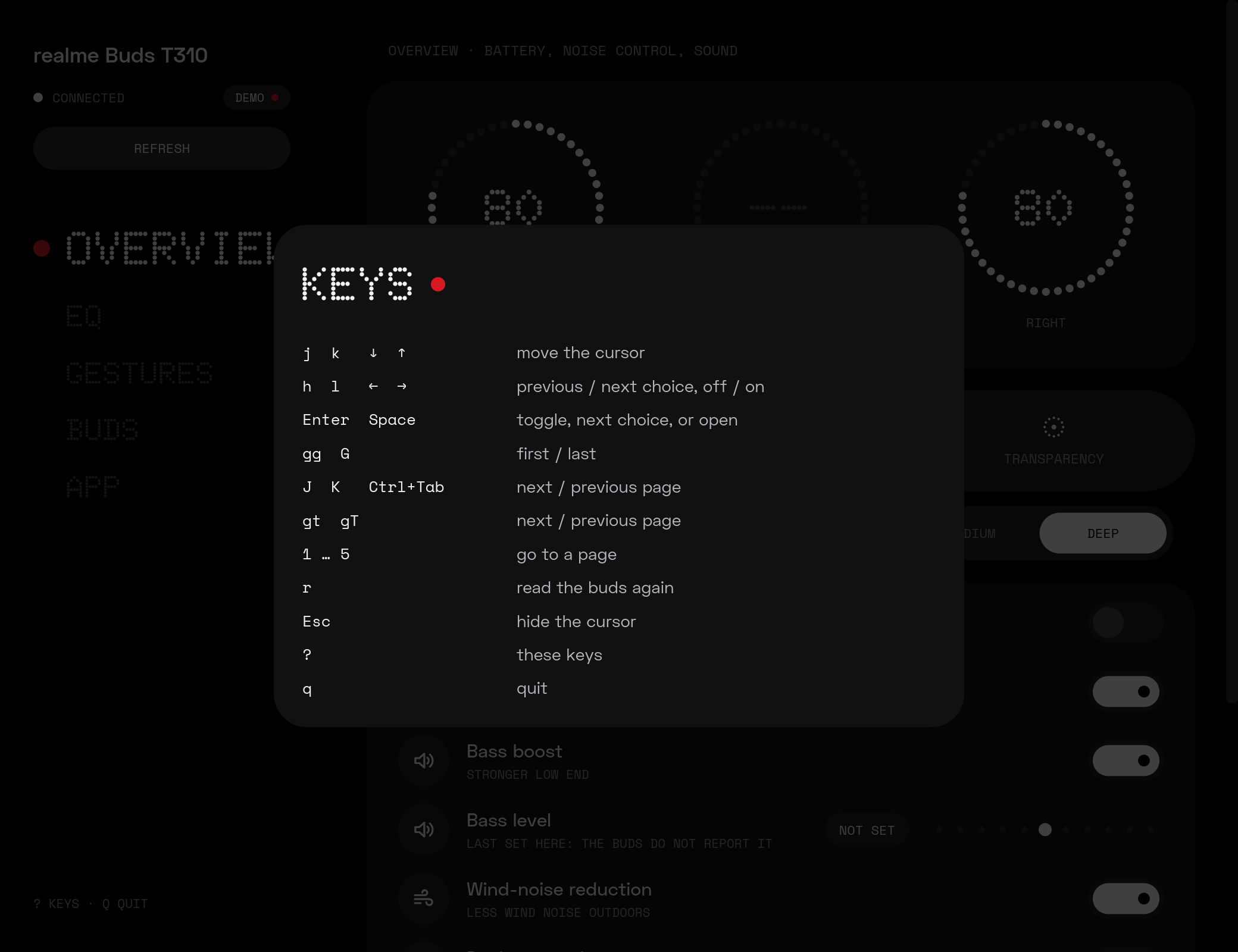
The mouse works everywhere. Vim-like keys work on top of it (press ? in the window):
| Keys | What they do |
|---|---|
j k, arrows, Tab |
move the cursor |
gg G |
first / last item |
h l |
previous / next choice, switch off / on; l opens a row's page |
| Enter, Space | toggle, step through the choices, or open |
J K, Ctrl+Tab, gt gT |
next / previous page |
1 … 5 |
go to a page |
r |
read the buds again |
| Esc | hide the cursor |
q |
quit |
The cursor shows only after you press a key, and the first key only shows it.
Look: Nothing OS shapes and type in Material You colors: dot-matrix page names and battery figures, LED rings and dotted sliders, pill switches and tracks. The fonts (Doto, Space Grotesk, Space Mono) are built into the app.
Colors: a built-in palette (near-black, white "on" states, red for live things such as the open
page's dot and "Saving…"), or a matugen palette: --theme <file>, else ~/.config/budctl/theme.json. The file is JSON with Material 3 roles, on_x spelled
xFg, all optional: primary, primaryFg, primaryContainer, primaryContainerFg, tertiary,
tertiaryFg, surfaceLowest, surfaceLow, surfaceHigh, surfaceHighest, surfaceFg,
surfaceVariantFg, outline, outlineVariant, err, errFg (bg and fg still work for
surfaceLowest and surfaceFg; other keys are ignored). A matugen template only needs lines like
"primary": "{{colors.primary.default.hex}}". The file is read again whenever the window gets
focus, so a new wallpaper's colors show up there too. When the file is missing, the app writes the
built-in colors there: a starting point for a template.
Log: each launch writes errors and session events (connected, each change and its answer,
closed) to ~/.local/state/budctl/gui.log, replacing the last launch's.
Other options: --demo shows made-up buds without Bluetooth; --debug and --device work as in
the command-line tool.
Config
~/.config/budctl/config.json is created with the defaults the first time it is needed. Every key
is optional; a file with a mistake is reported and the defaults are used.
{
  "device": null,
  "gui": {
    "idle_seconds": 10,
    "start_page": "overview",
    "motion": true
  }
}device: the buds to use when--deviceis not given, as"AA:BB:CC:DD:EE:FF".gui.idle_seconds: how long the app keeps the control channel open after the last change (1–600).gui.start_page:overview,equalizer,gestures,earbudsorsettings.gui.motion:falseturns the app's animations off; every change then shows at once.
How it works
budctl speaks the buds' own control protocol over an RFCOMM socket. What is known about it, and
how sure, is written down in docs/protocol/: the
transport and the realme Buds T310.
License
GPL-3.0-or-later. See LICENSE.
The desktop app carries the Doto, Space Grotesk and Space Mono fonts, under the SIL Open Font
License 1.1 (crates/budctl-gui/fonts/OFL.txt). The Doto in it
is a static instance (rounded dots, black weight, Latin only), renamed "Doto Rounded" as the
license asks of modified fonts.